


.png)
What You'll Learn
Most guides on payment systems for small businesses are ranked lists of providers. This one works through the six criteria that should drive your decision before you look at any specific product. It covers what matters most for service-based businesses, from salons and HVAC companies to auto shops and medical practices. The Federal Reserve's 2025 Diary of Consumer Payment Choice found that consumers averaged 11 mobile phone payments per month in 2024, up from just 4 in 2018 — and that shift is already showing up at the front desk. The post also walks through how to calculate your true processing cost from your actual merchant statement so you can compare systems on real numbers, not estimates.
Key Takeaways
- How you actually collect payment, whether in person, in the field, or via invoice, is the single most important factor. A system designed for high-volume big box checkout often creates friction for service businesses and specialty retailers.
- Consumers averaged 11 mobile phone payments per month in 2024, up from 4 per month in 2018, per the Federal Reserve's 2025 Diary of Consumer Payment Choice. If your business can't accept tap-to-pay or digital wallets, customers feel the gap.
- Your effective rate is the only apples-to-apples number for comparing systems. Divide total fees by total card volume and multiply by 100. Your merchant statement has both figures.
- Card-present and card-not-present transactions may carry different cost structures on interchange-plus pricing. Knowing which collection methods your business relies on most helps you evaluate that impact.
- Settlement timing affects real cash flow. For businesses with daily costs like fuel, supplies, or payroll, the difference between next-day and two-to-three-day funding matters.
- Stored-card billing, installments, and recurring payment tools matter for service businesses with repeat customers, whether you're a chiropractor managing weekly appointments or an HVAC company with service contracts.
- Hardware needs to match your work environment. If you collect payment in the field, at a front desk, and sometimes over the phone, your system should handle all three without separate logins or siloed reporting.
Most guides to payment systems for small businesses hand you a ranked list of providers and stop there. That is helpful once you know what your business needs. Without that foundation, you can end up paying for features you don't use, missing ones you do, and switching systems six months later.
This guide works through six factors that should shape your evaluation before you compare any specific products. Get those six things right first, and the list of options that fit your business gets much shorter.
Processing costs vary based on your pricing model, transaction mix, and how payments are collected. The examples below reflect common patterns, but your actual costs may differ.
SwipeSimple
Find the right system
See if SwipeSimple can help you cut processing costs and improve your payment processes.
Get Started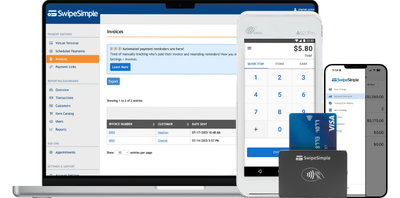
Why Your Payment System Choice Has Bigger Consequences in 2026
Customer payment behavior has shifted faster in the past five years than in the previous twenty. Credit cards now account for 35% of all consumer payments, with debit cards at 30% and cash down to 14%, according to the Federal Reserve's 2025 Diary of Consumer Payment Choice. Mobile phone payments have nearly tripled since 2018.
For service businesses, that shift creates a gap that costs money in both directions. Businesses that can't accept contactless cards or Apple Pay lose customers who expect it. Businesses that accept every payment method but track them in different systems spend hours reconciling records they should be able to pull in a single report.
Beyond customer expectations, the stakes around settlement speed and processing costs have gotten higher. Four consecutive years of declining revenue for small businesses with 1 to 9 employees means most service businesses are running on tighter margins than they were in 2022. The difference between a payment system that fits your workflow and one that doesn't is no longer just a convenience question. It is a cash flow question.
What to Look for in Payment Systems for Small Business
Six criteria tend to separate the systems that work for service businesses from the ones that create friction. Not all six carry equal weight for every business type, but every business should evaluate all of them before committing.
1. Workflow fit: how you actually collect payment
This is the most important factor and the one most evaluation guides skip entirely. A payment system optimized for high-volume big box checkout, fast transactions, large SKU catalogs, may be a poor fit for an HVAC technician collecting payment at a job site, a therapist sending invoices at the end of each session, or a salon owner running card-on-file charges for regular clients.
Before evaluating any system, think about your actual collection workflow. Do you take cards in person? Send invoices after the work is done? Collect deposits in advance? Take payments over the phone? Each scenario requires different tools, and a good payment system for small business should handle all of the ones your business needs without requiring you to use separate apps or log into separate platforms.
2. Settlement speed
When does money actually land in your account? Most payment systems offer next-business-day, but the details vary. Some charge extra for faster deposits, others include it in the base price. For businesses with daily expenses like fuel, materials, or payroll, even a one-day difference in settlement timing matters.
Ask any provider: what is the standard settlement timeline, and what does it cost to receive funds faster?
3. Fee transparency
This is where the most confusion happens. Processing fees are real and meaningful, but they are almost impossible to compare directly across systems without understanding your own usage first.
The single most useful calculation you can do: take your last three merchant statements, add up all fees, add up total card volume, divide fees by volume, and multiply by 100. That is your effective rate or, simply put, the actual percentage you're paying across all transaction types. It is the only number that makes honest comparison between systems possible.
Card-present transactions, where your customer taps, swipes, or dips their card in person, typically carry different rates than card-not-present transactions, where payment is taken over the phone, via invoice, or through a text payment link, depending on your pricing model. On interchange-plus pricing, these differences flow through to your statement directly. On flat-rate pricing, your processor absorbs the difference. Neither model is inherently better; the right choice depends on your mix of transaction types and volume.
4. Hardware flexibility
The right hardware depends entirely on where you work. An HVAC technician who collects payment at job sites needs something different from a salon owner with a permanent front desk, and both are different from a chiropractor who sometimes takes phone payments.
For field-based businesses, a mobile card reader that connects to a phone or tablet, or a solution that lets you accept tap-to-pay directly on a smartphone with no additional hardware, covers most situations without requiring bulky equipment.
For businesses with a permanent location, a countertop terminal handles volume quickly and gives customers a reliable checkout experience.
For businesses that need both, a system where field and front-desk transactions feed into the same reporting dashboard saves hours of reconciliation time every week.
5. Invoicing and remote payment tools
Even primarily in-person businesses send invoices. A chiropractor has no-show appointments. A landscaping contractor has a customer who wants to pay from home. A salon client forgot their wallet and needs a text payment link to close out.
Payment systems for small businesses that handle these scenarios smoothly keep cash flowing without requiring follow-up phone calls. Look for email or text invoice delivery, automatic payment reminders for unpaid invoices, payment links you can share via text or email, and the ability to take payments over the phone using a virtual terminal.
These tools serve real workflow needs. Depending on your pricing model, the cost structure for card-not-present transactions may differ from in-person collection. Check your merchant statement for the breakdown.
6. Customer management and repeat billing
If your business relies on repeat customers, your payment system needs to support those workflows natively. Stored-card billing lets you charge a customer's card on file without requiring them to be present or re-enter their card each time. Recurring billing handles scheduled charges automatically. Installment splitting divides a larger balance into scheduled partial payments.
These features matter most for medical practices, fitness studios, home services companies with contracts, and beauty businesses with loyal regulars.
Understanding What Payment Systems for Small Business Actually Cost
The hardest part of evaluating payment systems for small business is that most pricing comparisons rely on advertised rates rather than actual costs. Two systems with identical advertised rates can have meaningfully different actual costs depending on your transaction mix, average ticket size, and whether you process more payments in person or remotely.
The effective rate calculation described above gives you a real baseline. Here is exactly how to find the numbers on a standard merchant statement:
- Look for a line showing total card processing fees for the billing period. It may appear as "total discount" or "processing fees" depending on your processor.
- Find the total card volume processed in the same period. This is sometimes labeled "net sales" or "total volume."
- Divide total fees by total volume, then multiply by 100.
A landscaping company processing $18,000 per month in card payments with $500 in fees is paying an effective rate of 2.78%. Use your own figure as the baseline when evaluating any new system. If a provider's quoted pricing would result in a higher effective rate given your transaction mix, you have a concrete reason to negotiate or move on.
NACHA reported that the use of checks in B2B payments has dropped from 81% in 2004 to just 26% in 2024 — a sign that businesses of all sizes have shifted to electronic payment tools. For service businesses with commercial accounts or larger invoices, ACH payments typically carry lower per-transaction costs than card payments, making them worth considering for situations where cards are not required.
Hardware, Invoicing, and the Tools That Match Your Workflow
A useful way to evaluate any system: list every situation in which you take a payment, then check whether it handles each one.
- For a mobile electrician: a card reader that pairs with a phone, tap-to-pay on the phone itself as a backup, and an invoicing tool for jobs where the customer is not on-site when the work finishes.
- For a dental practice: a countertop terminal at checkout, a virtual terminal for phone payments, and installment or payment plan tools for larger balances.
- For a boutique salon: a front-desk terminal for walk-in clients, card-on-file billing for regulars, and text-based payment links for no-shows who owe a cancellation fee.
The goal in each scenario is the same: one system, one login, and one place to run reports regardless of how the payment was collected.
How SwipeSimple Is Built for the Way Service Businesses Collect Payment
SwipeSimple is a payment processing platform built specifically for small businesses that collect payment in person, in the field, and through invoices and text messages. It addresses all six criteria above through a single platform designed for home services, medical and professional practices, beauty businesses, automotive, and specialty retail.
For in-person and field collection: Tap to Pay on iPhone (find an implementation guide here) lets you accept contactless cards, Apple Pay, and digital wallets directly on your iPhone with no additional hardware required. Card readers connect to any phone or tablet for businesses that prefer dedicated hardware. The SwipeSimple Terminal is an all-in-one handheld device with a built-in receipt printer for businesses that want a countertop option.
For invoicing and remote collection: Invoices can be sent via email or text and include automatic payment reminders for outstanding balances, reducing the time you spend chasing unpaid work. Text to Pay sends a payment request directly to a customer's phone in seconds. The Virtual Terminal handles phone payments from any computer. Payment Links give you a shareable link for any payment situation where a terminal is not the right tool.
For repeat customers: The customer management tools let you store cards securely and process repeat charges without the customer needing to be present. Installments split a total into scheduled payments collected over time. Subscriptions handle recurring billing on a set schedule.
All of these feed into one reporting dashboard, so your in-person transactions and your invoice payments show up in the same place.
SwipeSimple
Find the right system
See if SwipeSimple can help you cut processing costs and improve your payment processes.
Get Started
Frequently Asked Questions
What is the most important thing to look for in a payment system for a small business?
The most important factor is whether the system matches how your business actually collects payment. A system built for high-volume big box checkout may create friction for a service business or specialty retailer that collects a mix of in-person payments, invoiced work, and phone payments. Before comparing specific products, map out the different ways your customers pay you and confirm that any system you consider handles all of them without requiring separate platforms or manual reconciliation.
How do I calculate what a payment system actually costs my business?
Divide your total processing fees for a billing period by your total card volume for the same period, then multiply by 100. That gives you your effective rate — the actual percentage you're paying across all transaction types. Your merchant statement has both numbers. Use this figure as your baseline when comparing systems, because advertised rates don't always reflect the actual cost given your specific transaction mix and pricing model.
What is the difference between card-present and card-not-present transactions?
Card-present transactions are ones where your customer physically taps, swipes, or dips their card at a terminal. Card-not-present transactions are ones where the card is not physically used, like payments taken over the phone, via an invoice, or through a text payment link. On interchange-plus pricing, these two types may carry different cost structures because they carry different fraud risk profiles. On flat-rate pricing, your processor charges the same rate regardless of transaction type. Check with your processor about how your pricing model treats each.
Does my business really need invoicing tools if I mostly collect payment in person?
Most service businesses send invoices more often than they expect to. Even primarily in-person businesses have customers who are not on-site when the job finishes, clients who need to pay remotely, or situations where card collection was not possible in the moment. Invoicing tools, text payment links, and virtual terminal access prevent those situations from becoming unpaid receivables. They also serve an important role for commercial accounts, larger project balances, and customers whose on-site schedules don't align with payment collection.
What is settlement speed and why does it matter?
Settlement speed is how quickly money from a completed transaction reaches your bank account. For businesses with tight daily cash flow the difference is real. Ask any provider for their standard settlement timeline before you sign up, and ask what it costs to access faster funding.
Wrapping Up
Choosing the right payment system for your small business starts with understanding your own workflow, how you collect payment, how often, and in what situations. Systems that look similar on a feature comparison can behave very differently once they're running in the middle of a busy service day.
Work through the six criteria above before evaluating any specific product: workflow fit, settlement speed, fee transparency, hardware flexibility, invoicing and remote payment tools, and repeat billing capabilities. Calculate your effective rate from your current merchant statement so you have a real number to compare, not an estimate.
SwipeSimple is built for businesses that collect payment in person, in the field, and through invoices and text messages — with all of it showing up in one dashboard. See how it works here.
Related posts
.png)
Best Invoicing Software for Small Business in 2026
.png)
Flat Rate Pricing for HVAC Contractors: Is Time and Materials Costing You Money?
.png)




