


.png)
What You'll Learn
This post walks you through how to choose the right card reader for your plumbing business and start collecting payment the moment you wrap a job. Credit and debit cards now account for 65% of all U.S. consumer payments, according to the Federal Reserve's 2025 Diary of Consumer Payment Choice, which means your customers expect to pay by card. You'll learn what hardware options work for plumbers specifically, how to handle jobs where you can't swipe in person, and what features actually matter when your office is a van.
Key Takeaways
- Customers expect to pay by card. Credit and debit now account for 65% of all U.S. consumer payments — not accepting one costs you reviews and repeat business.
- A mobile card reader turns your phone into a full POS. Pair it with the SwipeSimple app and you can collect, invoice, and receipt from any job site.
- Card-present vs. card-not-present affects your rate. In-person tap/swipe/dip is card-present. Invoice links, Text to Pay, and phone payments are not — know the difference before you read your statement.
- When the customer isn't home, send the invoice before you leave. Text or email payment links with automatic reminders eliminate the follow-up call entirely.
- Big jobs don't have to be a collections risk. Installments let you split large totals into a scheduled payment plan the customer agrees to upfront.
SwipeSimple
Get paid the moment the job is done.
Accept cards on the job, send invoices by text, and collect from customers who aren't home — all from your phone.
Get Started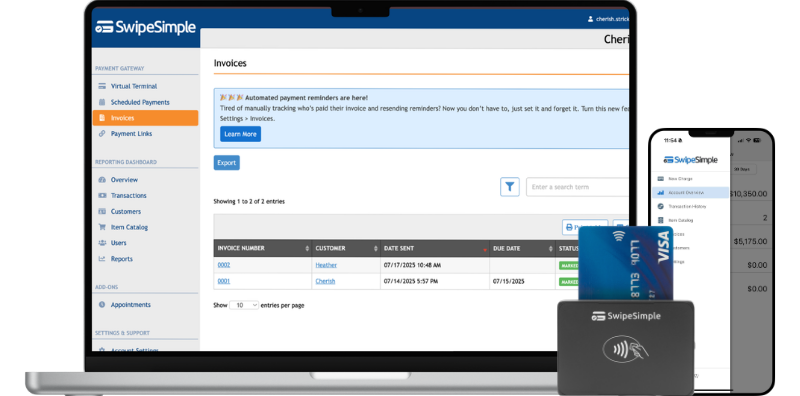
You finished the job. The customer is happy. The water is running. The last thing you want to do is chase a check for the next three weeks.
For a lot of plumbing contractors, collections are the messiest part of the business. Cash jobs go untracked. Checks bounce or stall. Invoices go ignored. And every day a payment sits outstanding is a day your cash flow takes a hit.
The right card reader for plumbers solves the most immediate version of that problem: getting paid before you leave the driveway. But picking the right setup takes a little more thought than just buying the cheapest Bluetooth reader you can find. Below, you'll find a practical breakdown of what to look for, which options work best in the field, and how to handle the job types where swiping a card in person isn't an option.
Processing costs vary based on your pricing model, transaction mix, and how payments are collected. The examples below reflect common patterns, but your actual costs may differ.
What Makes the Best Card Reader for Plumbers Different from Other Businesses
Most card reader reviews are written for retail shops and coffee stands. Plumbers have a different set of constraints.
You're not behind a counter. You're crawling under sinks, working in tight utility closets, and finishing jobs in basements with no Wi-Fi. Your customer isn't always home when you're done. And your jobs range from $80 service calls to $8,000 repipes, which means you need a system that handles both small tap-and-go payments and larger transactions where a customer might want a receipt emailed, an installment plan, or a few hours to review the invoice before paying.
Here's what actually matters when you're evaluating card readers for a plumbing operation:
Portability. The reader has to survive in a truck, slip into a tool bag, and work without a dedicated Wi-Fi connection. Bluetooth readers that pair with your phone work well here because they use your phone's data connection rather than requiring a separate network.
Battery life. A reader that dies mid-shift is worse than no reader. Look for devices that can handle a full day of jobs on a single charge, or that recharge quickly enough to top up between calls.
Connectivity options. You'll run into dead zones. Your payment setup should work in low-signal environments and queue transactions when needed.
Software that fits your workflow. The reader is only half the equation. The app behind it needs to handle invoices, track which jobs have been paid, and give you a clean view of your books at the end of the week.
Multiple ways to collect. Some customers won't be home. Some will call to add on work after they've seen your invoice. The best setup for plumbers supports card-present transactions at the job site and card-not-present transactions when you're collecting remotely.
Hardware Options: Choosing the Best Card Reader for Plumbers
There are three main hardware configurations that work well for plumbing businesses. Each has a different use case.
1. Mobile Card Reader Plus Smartphone or Tablet
A Bluetooth card reader paired with a mobile app is the most flexible setup for solo plumbers and small crews. The reader connects wirelessly to your phone, accepts chip, swipe, and tap payments, and sends receipts by text or email on the spot.
When it works best: Service calls, repair jobs, and any situation where you finish the work, present the total, and collect right there.
Real-world example: You finish a water heater replacement and pull up the job total on your phone. The customer taps their card. Receipt goes to their email. You're on to the next call.
What to watch: Card-present transactions, where the customer physically taps, swipes, or dips their card at your reader, typically carry lower processing rates than card-not-present transactions. Knowing which rate applies helps you understand your monthly statement.
SwipeSimple's card readers are built for this kind of mobile setup, pairing with any smartphone or tablet through the SwipeSimple app.
2. Tap to Pay on iPhone
If you have an iPhone, you can accept contactless payments, including Apple Pay and digital wallets, directly on the device with no separate hardware. This is card-present, so you get the lower card-present rate. It's useful as a primary tool for plumbers who want to travel light, or as a backup on days when your reader is in a different truck.
When it works best: Small service calls, add-on charges, or any time you need to collect quickly without digging through your bag for hardware.
Important note: Tap to Pay on iPhone works on iPhone only, not Android.
3. SwipeSimple Terminal
The SwipeSimple Terminal is an all-in-one handheld device with a built-in receipt printer. It doesn't depend on your phone, which makes it a strong choice for larger plumbing businesses running multiple crews, or for contractors who prefer a dedicated payment device that stays charged and ready in the truck.
When it works best: Larger ticket jobs where a customer wants a printed receipt on the spot. Commercial accounts. Any situation where you want the payment device separate from your personal phone.
Beyond the Card Reader: How to Get Paid When You're Not There
A card reader handles the jobs where the customer is present. But a significant share of plumbing calls end with the customer at work, a tenant who left before you arrived, or a property manager who needs to approve the invoice before releasing payment.
For those situations, card-not-present options cover the gap.
Invoices via text or email. SwipeSimple's invoicing feature lets you build a professional invoice from your phone and send it by text or email before you've backed out of the driveway. The invoice includes a payment link, automatic reminders go out if the customer hasn't paid, and you get notified the moment payment comes through. The workflow value here is the elimination of follow-up calls. You send the invoice once and the system handles the reminder sequence.
Text to Pay. Send a payment request directly to a customer's phone number. The customer receives a text with a secure link, taps it, and pays. It takes about 30 seconds to send from the app.
Virtual Terminal. For customers who call in to pay by phone, the Virtual Terminal lets you key in their card number from any browser without the customer physically being present. This is a card-not-present transaction, so rates may differ from in-person swipes depending on your pricing model.
Payment Links. A shareable link works well for recurring customers or for situations where you want to send a pay-now option through your own message thread.
Real-world example: You finish a drain clearing job at a rental property. The landlord is two states away. You send the invoice by text through the app before you get back on the highway. The landlord pays from their phone that evening. No invoice aging, no collections call, no check in the mail.
Managing Large Jobs and Repeat Customers
Two features matter more than most plumbers expect when they first set up a payment system: installments and saved cards.
Installments. A major repiping job, a sewer line replacement, or a full bathroom rough-in can run into thousands of dollars. Some customers hesitate on that number even when they trust your work. Installments let you split the total into a scheduled payment plan, which can make a big job feel more approachable without you carrying the risk of collecting later. SwipeSimple's Installments feature is built into the core platform and lets you define the schedule when you build the invoice.
Managing Customers and stored cards. For customers you service regularly, such as property managers with multiple units or small commercial accounts, the Managing Customers feature lets you store card information securely and process repeat payments without the customer having to hand over their card every time. You call, confirm the work, collect through the app. Simple.
Reporting Dashboard. At the end of the week, you should be able to pull up a clear view of what came in, what's outstanding, and which jobs have been paid. SwipeSimple's reporting dashboard tracks transactions, exports reports, and gives you the sales trend view you need to understand which services are driving revenue.
On-demand QuickBooks Sync. SwipeSimple's QuickBooks Online Sync pushes your payment data to QuickBooks on demand, not in real time and not automatically. You initiate the sync when you're ready. It keeps your payment records and accounting records aligned without creating duplicate entries or overwriting data you've edited in QuickBooks.
SwipeSimple
Get paid the moment the job is done.
Accept cards on the job, send invoices by text, and collect from customers who aren't home — all from your phone.
Get Started
What to Know About Payment Processing Costs for Plumbers
Processing costs are one of the first questions plumbing contractors ask when they're shopping for a card reader. The honest answer is that your costs depend on factors that vary by business: your pricing model (flat-rate, interchange-plus, or tiered), your transaction mix, your average ticket size, and whether most of your payments are card-present or card-not-present.
Card-present transactions happen when the customer physically taps, swipes, or dips their card at your reader. These are in-person payments collected at the job site.
Card-not-present transactions happen when you take payment over the phone, via invoice, or through a text link. The card is not physically used at the point of sale. Card-not-present transactions typically carry different rates than card-present transactions, and the difference varies by pricing model.
A few things to keep in mind:
- On interchange-plus pricing, your card mix can affect your overall costs. Different card types carry different interchange rates set by the card networks.
- On flat-rate pricing, you pay the same percentage regardless of card type, which simplifies your statement but may cost more on low-interchange transactions.
- On tiered pricing, transactions are sorted into rate buckets that vary by card type and how the payment was collected.
The most important thing is understanding which type of transaction generates which rate on your statement, so you're not surprised at the end of the month. Ask your processor to walk you through a sample statement before you commit.
Frequently Asked Questions
Do I need a card reader to accept credit cards as a plumber?
Not necessarily. A card reader is the right tool when the customer is present and you want card-present rates. But if your customers are often away when you finish or prefer to pay later, you can collect payment without any hardware using invoices, Text to Pay, Payment Links, or the Virtual Terminal. Most plumbing businesses end up using a combination, with a card reader for in-person jobs and a digital option for the rest.
What's the difference between card-present and card-not-present for a plumbing business?
Card-present means the customer physically taps, swipes, or dips their card at your reader while you're at the job site. Card-not-present means you're collecting payment through an invoice link, over the phone, or via a text payment request. The distinction matters because these transaction types typically carry different rates depending on your pricing model. Always clarify with your processor which rate applies to each method you plan to use.
Can I accept payments in areas with poor cell signal?
Coverage gaps are a real issue, especially in basements, crawl spaces, and rural areas. Most mobile card readers rely on your phone's data connection, so if your phone has no signal, the transaction won't process in the moment. The practical fix: finish the job, move to a location with signal, and run the payment there. For larger jobs, consider collecting payment before leaving the property rather than after you've already driven away. Some processors also support offline transaction modes with limitations. Ask your processor specifically about how their system handles low-connectivity situations.
How do I handle customers who aren't home when I finish a job?
This is one of the most common cash flow headaches in the plumbing trade. Invoice-based and text payment options solve it cleanly. Build the invoice in your app, send it to the customer's phone or email before you leave the property, and set up automatic reminders so the system follows up if they haven't paid. You get notified the moment payment comes through. No chase calls, no check in the mail.
Is Tap to Pay safe for collecting payment on a job site?
Yes. Tap to Pay on iPhone uses the same near-field communication (NFC) technology and tokenization as any contactless payment terminal. The customer's actual card number is never stored on your device. Transactions are encrypted and processed through the same secure networks as traditional card readers. For customers who are cautious about contactless payment, they can also dip their chip card or swipe, depending on the hardware you have available.
Wrapping Up
Collecting payment on the job doesn't have to be an afterthought. The right card reader for plumbers fits the way you actually work: mobile, flexible, and capable of handling both in-person swipes and remote invoicing when the customer isn't home.
Credit and debit cards now represent 65% of all consumer payments. Customers expect to pay by card. Making it easy for them to do so, right when the job is done, is one of the simplest ways to improve your collection rate and keep cash moving through your business.
SwipeSimple is built for contractors who work in the field. Browse card reader options at home.swipesimple.com/card-readers, or explore Tap to Pay on iPhone if you want to accept contactless payments with no additional hardware. For larger operations that want a dedicated handheld device, the SwipeSimple Terminal comes with a built-in receipt printer and works independently of your phone.
Related posts
.png)
Best Invoicing Software for Small Business in 2026
.png)
Flat Rate Pricing for HVAC Contractors: Is Time and Materials Costing You Money?
.png)




