


.png)
What You'll Learn
Getting paid as an electrician should not be complicated. This post breaks down what electrical contractors actually need from a payment app, which features matter most for field work, and how to close out jobs financially before you leave the property. According to the U.S. Bureau of Labor Statistics, electricians held about 818,700 jobs in 2024 and employment is projected to grow 9 percent through 2034, which is much faster than the average for all occupations. That growth means more electrical contractors competing for the same customers, and the ones who make it easy to pay will have an edge.
Key Takeaways
- Collecting payment at the job site is the single most effective way to protect cash flow as an electrician. The right app makes it possible on every call.
- Tap to Pay on iPhone lets you accept contactless cards and digital wallets using only your iPhone, with no card reader or extra hardware needed.
- Text and email invoices with automatic reminders reduce the time you spend chasing unpaid balances after the job is done.
- Deposits collected before work begins protect you on large panel replacements, rewires, and commercial jobs where material costs are significant.
- Installment plans give homeowners a way to say yes to bigger jobs without requiring full payment upfront.
- The Federal Reserve's 2024 Small Business Credit Survey found that 51 percent of small businesses reported uneven cash flow as a financial challenge, a pattern electrical contractors know well.
- A mobile app built for field work means you can take payment, send a receipt, and drive to the next job, all from the same device in your pocket.
Running your own electrical business means your schedule is full: service calls, panel upgrades, new construction, commercial work. The jobs get done. But the money? That part often lags. A customer who was happy when you finished the work becomes a phone call you have to make two weeks later because the invoice is still sitting in their inbox unopened.
The best payment app for electricians closes that gap. The right tool lets you collect payment before you pull out of the driveway, send a professional invoice by text in under a minute, and follow up automatically without burning your own time. It works whether you are doing a $150 outlet repair or a $12,000 service panel replacement.
Processing costs vary based on your pricing model, transaction mix, and how payments are collected. The examples below reflect common patterns, but your actual costs may differ.
This post covers the features that matter most for electrical contractors, how to set up a payment flow that works in the field, and what to look for when comparing your options.
SwipeSimple
Get paid the moment the job is done.
Accept cards on the job, send invoices by text, and collect from customers who aren't home — all from your phone.
Get Started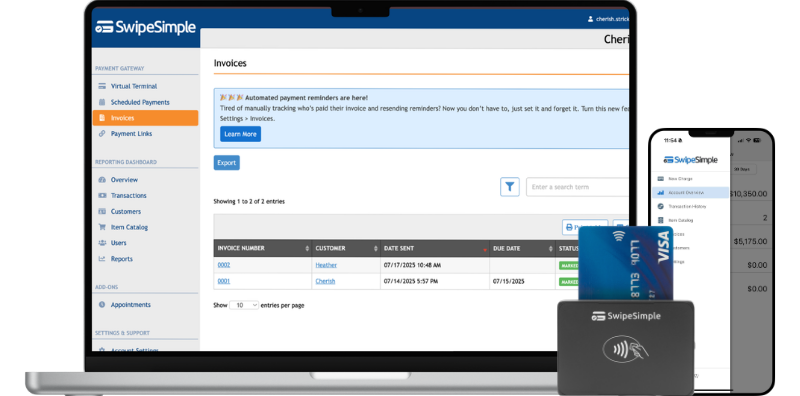
What Electrical Contractors Actually Need From a Payment App
Most payment apps are built for retailers standing behind a counter. You are not standing behind a counter. You are in an attic, a crawl space, or a breaker room. You are driving between three jobs in a single day. You need something that works on your phone, in the field, with one hand free.
Here is what matters specifically for electrical contractors.
On-site card collection. The best outcome on any service call is getting paid before you pack up your tools. An app that lets you take a card payment from your phone, with or without a card reader, makes that possible on every job.
Invoicing that follows up for you. Not every job ends with immediate payment. Sometimes you are doing a phase of a larger project. Sometimes the customer is not home when you finish. A good app sends a professional invoice by text or email, with a payment link the customer can tap from their phone. Automatic reminders follow up on day three and day seven so you do not have to track each open balance yourself.
Deposits before you start. Material costs for electrical work can run high before a single hour of labor is logged. On a panel upgrade, a whole-home rewire, or a commercial buildout, you need payment before you order parts. A payment app that lets you send a deposit request by text or link, confirms payment before you schedule the job, and protects your materials investment.
Support for larger jobs. Residential customers who want a new electrical service or a full home rewire may not be able to pay the entire amount at once. Installment payments give them a path to yes. Commercial customers may want to pay in stages tied to project milestones. Your app should handle both.
A simple, professional experience. When you hand your phone to a homeowner and ask them to tap their card, that interaction reflects on your business. The payment should be clean, fast, and straightforward.
The Best Payment App for Electricians: Features Worth Comparing
When you evaluate payment apps, focus on the features that actually affect how your business runs day to day. Here is what to look for.
Mobile App. Everything runs through your phone. The app should load fast, work on a cell signal, and not require your customer to download anything to pay. When cell service goes down, it should allow you to store the payment as to run when service returns. If your apprentice or helper also collects payments, they should be able to use the same account from their device.
Tap to Pay on iPhone. This is one of the most useful tools for an electrician on a service call. It turns your iPhone into a contactless card reader. The customer taps their card, Apple Pay, or Google Pay near the back of your phone, and the payment processes. No hardware, no reader to forget in the truck. Tap to Pay on iPhone is a card-present transaction, which means the physical card is present at the time of the sale. Card-not-present transactions (such as when a customer calls in a card number or pays an invoice online) work differently, and processing costs may vary between the two under most pricing models.
Pro tip: Keep Tap to Pay on iPhone active for quick service calls where you want to close out fast. For larger jobs where the customer expects a receipt, use the SwipeSimple Terminal, an all-in-one handheld device with a built-in receipt printer that handles both.
Card Readers. For jobs where a physical reader makes more sense, a compact card reader connects to your phone and lets customers tap, swipe, or dip their card. Easy to carry in your tool bag or truck console.
Invoicing by Text and Email. The invoice should go out within minutes of finishing a job. Customers pay from the link in the text or email with no login required. Automatic payment reminders fire on the schedule you set so you do not have to track each open balance manually.
Text to Pay and Payment Links. These let you request payment by text message or share a link customers can open anywhere. Useful when a customer calls in to pay a balance or when you want to send a quick payment request without building a full invoice.
Installments. For panel replacements, whole-home rewires, and commercial projects, installments let you split the total into scheduled payments. You set the schedule upfront, the customer agrees, and the payments run automatically. This is a core SwipeSimple feature built into the platform.
Reporting Dashboard. You need to see which invoices are open, which have been paid, and what your volume looks like. A clean reporting view keeps you out of the spreadsheet.
Setting Up the Best Payment App for Electricians on Your Jobs
The right payment setup for an electrical contractor is not complicated, but it does need to match how your jobs actually run. Here is a practical flow that works for most electrical service businesses.
- Install the app before the busy season starts. Set up your account, connect your bank, and run a test transaction before you are juggling multiple jobs. A setup problem on a busy Wednesday costs you more than an hour.
- Enable Tap to Pay on iPhone on your primary device. This is your fastest path to same-day collection on service calls. Turn it on in the app, verify it works, and make it your default for residential jobs.
- Build a basic invoice template. Include your business name, standard line items for labor and materials, and payment terms. Speed matters. You should be able to generate and send an invoice in under two minutes at the end of a job.
- Set your invoice reminder schedule. Configure automatic reminders to send at three and seven days after a new invoice is issued. This eliminates most of your follow-up calls without you doing anything.
- Use deposits for any job over a threshold you set. If a job requires ordering materials before you start, send a deposit request before scheduling. The customer pays online, you get confirmation, and you place the order.
- Use installments for larger residential and commercial work. For a $5,000 service panel upgrade, set up three payments at contract signing: one-third at signing, one-third at rough-in, one-third at final inspection. Build this into your estimating process so customers know the option exists before they have to ask.
- Run a QuickBooks Online Sync at the end of the week. SwipeSimple's QuickBooks Online Sync is on-demand, not automatic. Once a week, run the sync and push your payment data into QuickBooks. It eliminates the manual entry that otherwise piles up at tax time.
How the Best Payment App for Electricians Handles Larger Jobs
A residential service call is one thing. A commercial office rewire or a new construction job is a different financial conversation. Larger electrical jobs require a payment approach that matches the project timeline.
Consider a residential contractor in the Midwest doing a full-home rewire on a 1960s house. The job runs $14,000 with materials and labor. The homeowner cannot pay everything upfront. Previously, this contractor sent a paper invoice at the end of the job and waited 30 to 45 days for a check. After switching to a payment app with installment support, the process changed.
Before the job started, the contractor sent a payment link for a $4,000 deposit. The homeowner paid from their phone in five minutes. A second installment of $5,000 was scheduled to process at rough-in. The final $5,000 processed at project closeout. The contractor never chased a payment. The homeowner found the structure manageable. The job closed on time financially, not weeks after.
Installments work by splitting a job total into scheduled charges. You set the amount and the date for each payment, the customer agrees to the plan, and the charges process automatically. This is especially useful for:
- Service panel upgrades and replacements
- Whole-home rewire projects
- New construction electrical rough-in and finish
- Commercial tenant buildouts billed in project phases
Subscriptions handle recurring billing for customers on a maintenance or inspection schedule. If you service commercial clients on a quarterly basis or manage a property manager's inspection schedule, recurring billing runs the charge automatically on the schedule you define.
Managing Customers stores payment information for clients who come back repeatedly. For commercial accounts or property management companies that authorize ongoing billing, this means their office does not have to supply card information before every invoice.
The Federal Reserve's 2024 Small Business Credit Survey found that 51 percent of small businesses reported uneven cash flow as a challenge. For electrical contractors, that unevenness is almost always tied to the gap between when labor and materials go out and when payment actually comes in. Structured payment schedules on larger jobs close that gap.
Invoicing and Follow-Up: Where Most Electricians Lose Money
Slow invoicing is one of the most common ways electrical contractors leave money on the table. According to industry analysis in EC&M Magazine, the cycle time between sending a bill and receiving payment is often closer to 60 days for electrical contractors. Invoices go out late and follow-up is inconsistent, so the money sits longer than it should.
Here is how that plays out in practice. A technician finishes a service call and leaves a paper invoice. The customer sets it aside. Three weeks later, the contractor notices it has not been paid and makes a call. The customer says the invoice got buried and asks for another copy. Another week passes. The payment finally lands 45 days after the job was done.
A mobile invoicing flow fixes most of that.
The technician finishes the job and opens the app. In two minutes, they fill in the line items, enter the customer's phone number or email, and send the invoice. The customer receives a text immediately with a button to pay. If they pay right then, the job is closed in minutes. If they do not, the app sends a reminder at day three and day seven automatically.
Here is what that looks like step by step:
- Job is complete. Technician opens the payment app.
- Technician creates an invoice with labor and materials.
- Invoice goes out by text to the customer's phone number.
- Customer taps the payment link and pays from their phone.
- Technician receives a confirmation and drives to the next job.
- If not paid by day three, an automatic reminder sends.
- If not paid by day seven, a second reminder sends.
- Open invoices show in the reporting dashboard so nothing gets missed.
When you pair this with a QuickBooks Online Sync, every paid invoice flows into your accounting records on demand. Run the sync at the end of the week and your books stay current without manual entry.
Frequently Asked Questions
What is the best payment app for electricians working in the field?
The best option for electrical contractors is one built specifically for mobile, field-based collection. You need on-site card acceptance, text and email invoicing with automatic reminders, the ability to collect deposits before a job starts, and support for installment payments on larger projects. SwipeSimple is designed for exactly this type of business. It includes Tap to Pay on iPhone, card readers, the SwipeSimple Terminal with a built-in receipt printer, invoices by text or email, Text to Pay, Payment Links, installments, subscriptions, and a reporting dashboard, all accessible through a mobile app your crew can carry on every job.
Can electricians accept credit card payments without a card reader?
Yes. With Tap to Pay on iPhone, you can accept contactless credit cards, debit cards, and digital wallets directly on your iPhone with no additional hardware. The customer taps their card or phone near yours, and the payment processes. This is a card-present transaction, meaning the physical card is present at the time of sale, which is one factor that affects processing costs under most pricing models. Tap to Pay on iPhone works on iPhone only, not Android.
How do I collect a deposit before an electrical job starts?
You can send a Payment Link or a Text to Pay request before the job is scheduled. The customer receives a message with a secure link, pays the deposit from their phone, and you get a confirmation before you order any materials or book the job in your schedule. This is particularly important for panel replacements, rewires, and commercial work where your material costs are significant before a single hour of labor is billed.
What is the difference between card-present and card-not-present transactions for electricians?
Card-present means the physical card was used at the time of the transaction. For example, when a customer taps their card to your iPhone or card reader while you are on the job site. Card-not-present means the physical card was not present. For example, when a customer calls in a card number to pay an outstanding invoice, or when they click a payment link and enter their card online. Processing costs can differ between card-present and card-not-present transactions depending on your pricing model. Collecting payment on-site using Tap to Pay or a card reader is card-present.
How do installment payments work for large electrical jobs?
Installments let you split a job total into scheduled charges that process automatically. You set the payment amounts and dates, the customer agrees to the plan, and each charge runs on schedule without requiring you to follow up. For example, on a $10,000 service panel replacement, you might set a $3,000 deposit at signing, a $4,000 payment at rough-in, and a $3,000 final payment at completion. Installments are a core SwipeSimple feature built into the platform. This approach helps close larger jobs where the full amount is a barrier for the customer, and it protects your cash flow throughout the project.
You Finished the Job. Getting Paid Should Be Just as Clean.
The work is done. The panel is in, the circuits are wired, the permit passed inspection. That moment, right there, is when you should close out the financial side of the job too. Not in a week. Not after three follow-up calls.
The best payment app for electricians makes that possible. It handles on-site collection with Tap to Pay on iPhone, sends a text invoice in under two minutes, follows up automatically, and keeps your receivables visible in one dashboard. For larger jobs, it structures deposits and installments so you are not waiting on a single check at the end of a project.
SwipeSimple is built for field-based contractors who need payments to work the way their business works. On-site collection, mobile invoicing, installments, recurring billing, and a clean reporting view that keeps you in control of your cash flow.
Get started at home.swipesimple.com/connect.
Related posts
.png)
Best Invoicing Software for Small Business in 2026
.png)
Flat Rate Pricing for HVAC Contractors: Is Time and Materials Costing You Money?
.png)




