


.png)
What You'll Learn
Finding the right payment app can change how quickly your HVAC business gets paid. This post breaks down what HVAC contractors actually need from a payment app, how field-ready solutions differ from generic tools, and which features matter most when you are collecting on the job site. According to the U.S. Bureau of Labor Statistics, HVAC mechanics and installers held about 425,200 jobs in 2024 and most of those workers collect payment in the field, away from a desk, often the same day the job is done.
Key Takeaways
- Collecting payment on-site is the fastest way to protect cash flow for HVAC contractors. The right app makes this possible without extra hardware.
- Tap to Pay on iPhone lets your technicians accept contactless cards and digital wallets using only their phone, with no card reader required.
- Text and email invoices with automatic payment reminders reduce the number of calls you make chasing unpaid balances.
- Deposits collected before the job starts protect your business on large installations and equipment orders.
- Installment plans give customers a way to say yes to bigger jobs without putting the financial burden entirely on them upfront.
- QuickBooks Online Sync keeps your job payments organized without double-entering data after every service call.
- A mobile app built for the field means your technicians can take payment, send a receipt, and move to the next job, all without calling the office.
Running an HVAC business means your team is constantly moving. A technician finishes a repair, the customer is happy, and then everything slows down because collecting payment is awkward or requires a trip back to the shop. You end up chasing invoices for days or weeks after the work is done.
The best payment app for HVAC contractors solves this at the point of service. Your tech collects payment before they leave the driveway. The money moves. The job is closed. That kind of speed is not just convenient — it protects your cash flow during peak season when you are juggling dozens of service calls a week.
This post covers what to look for in a payment app, which features matter most for field teams, and how to evaluate your options before committing.
SwipeSimple
Get paid before the truck leaves the driveway.
Get a personalized walkthrough and see which SwipeSimple tools fit your HVAC field team.
Get Started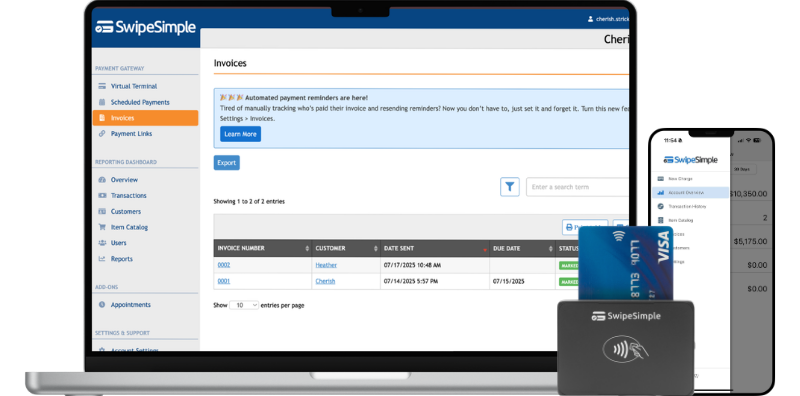
What HVAC Contractors Actually Need From a Payment App
Generic payment apps aren’t built for the way you work. Your team works in attics, crawl spaces, and mechanical rooms. They drive to multiple job sites in a day. They deal with customers who want to pay by card but do not have cash on hand and were not expecting a bill as large as the one for a full system replacement.
A payment app built for field service contractors needs to handle a few things that matter specifically to you.
On-site collection. The best outcome is getting paid before the technician leaves. An app that lets your team take card payments directly from a phone — or a handheld device — makes that possible on every job.
Invoicing after the fact. Not every job ends with a clean immediate payment. Sometimes the customer needs a few days. A good app lets you send a professional invoice by text or email, with a payment link the customer can tap from their phone. Automatic reminders follow up so you do not have to.
Deposits before the job starts. Equipment orders, large installations, and new construction projects often require a deposit upfront. You need an app that can send a payment request before any work begins, so you are not fronting thousands of dollars in materials without protection.
Repeat customers and stored cards. Many HVAC contractors have maintenance agreement customers who pay on a regular schedule. Managing those customers and their payment details in one place saves time and reduces manual billing.
A professional experience. Your customers are often homeowners who are already stressed because their AC went out in the middle of summer. A polished, simple payment experience builds trust, a clunky process does not.
The Best Payment App for HVAC Contractors: Features to Compare
When you are comparing payment apps, focus on the features that actually affect your daily operations. Here is how to evaluate what matters.
Mobile App. Your technicians need to take payments from their phones. The app should be fast, work on a cellular connection, and not require a complicated setup on every device. Look for an app your team can learn in one training session.
Tap to Pay on iPhone. This feature turns an iPhone into a contactless card reader with no additional hardware. Your tech holds the phone near the customer's card or digital wallet, and the payment goes through. It works for card-present transactions, which can affect your processing costs compared to card-not-present transactions — payments taken over the phone or online, where the physical card is not present at the time of sale. For HVAC contractors who want to minimize equipment, Tap to Pay on iPhone removes the need to carry a separate reader on every call.
Card Readers and Terminals. For jobs where a physical device is appropriate, a compact card reader that pairs with your phone keeps things simple. If your team does a high volume of jobs where customers expect a printed receipt, a SwipeSimple Terminal with a built-in receipt printer handles both without extra steps.
Invoicing. You need to send invoices by text or email, and customers should be able to pay from their phone without logging into an account or downloading an app. Automatic payment reminders are a critical feature — they follow up on unpaid invoices without requiring you to make a phone call.
Text to Pay and Payment Links. These tools let you send a payment request via text message or share a link that customers can open anywhere. Useful when a customer calls in to pay a balance after the job.
Collecting Payment on the Job Site: How the Best Apps Handle It
The moment your technician finishes a job is your best opportunity to collect payment. That window closes fast. A customer who walks back inside to "grab their card" may not return for twenty minutes. A customer who says they will "pay the invoice when it comes" becomes a receivable you have to manage for the next two weeks.
A residential HVAC contractor in the Southeast described their process this way: before adding a mobile payment app, their technicians left a paper invoice and hoped customers would call in with a card number. Average time to collect was 12 to 18 days. After switching to a mobile app with on-site tap-to-pay and text invoice capability, they began collecting same-day on about 80 percent of jobs. The difference in cash flow made it possible to purchase equipment inventory for the following season without a line of credit.
The key features that drive same-day collection are simple. First, the technician can take card payment directly from their device before leaving the property. Second, if the customer is not ready to pay on the spot, a text invoice goes out immediately and includes a one-tap payment link. Third, automatic reminders follow up without the contractor having to track each outstanding balance manually.
Card-present transactions, where the physical card is tapped or swiped at the time of service, typically carry different processing costs than card-not-present transactions. When your technician collects on-site using Tap to Pay on iPhone or a card reader, that is a card-present transaction. When a customer calls in a card number or pays an invoice online, that is card-not-present. Your pricing model will determine how those costs compare for your specific business.
Deposits, Installments, and Larger HVAC Jobs
Not every HVAC job is a $200 service call. Equipment replacements, full system installs, and commercial HVAC work often run into the thousands. Those jobs require a different payment strategy.
Deposits before the job. For any job where you are ordering equipment, collecting a deposit before work begins protects your business. A payment link or Text to Pay request sent before you schedule the job makes deposit collection natural and professional. The customer pays online from their phone, and you have documented confirmation before you place the parts order.
Installment payments. Some customers want to say yes to a $6,000 system replacement but cannot write a single check for the full amount. Installments let you split a job total into scheduled payments over time. The customer agrees to the payment plan, and the charges run on the schedule you set. This feature can be the difference between closing a large job or losing it to a competitor who offers financing.
A commercial HVAC contractor working on tenant buildouts in Texas uses installments to structure payments around construction milestones. The first payment comes at contract signing, the second at equipment delivery, and the final payment at startup. All three are set up in the app before the job starts, which means no chasing at the end of the project.
Subscriptions for maintenance agreements. If you offer seasonal maintenance plans or annual service agreements, recurring billing handles those automatically. Set the customer up once and the payment runs on schedule. No more calling customers each spring to collect the maintenance fee.
Managing Customers. Storing customer payment details means your front office can process a repeat charge without asking for card information again. For customers on maintenance plans or multi-job contracts, this reduces friction on both sides.
SwipeSimple
Get paid before the truck leaves the driveway.
Get a personalized walkthrough and see which SwipeSimple tools fit your HVAC field team.
Get Started
What to Look for in an HVAC Invoice App
Invoicing is not just a billing step. It is your last interaction with a customer before they decide whether to pay promptly, pay late, or not pay at all.
A professional invoice sent immediately after job completion sets a clear expectation. An automatic reminder sent three days later, and again seven days later, keeps the payment top of mind without putting the burden on you or your office staff to remember.
Here is what a good invoicing flow looks like for an HVAC contractor:
The technician finishes the job. Before leaving, they open the app and send a text invoice to the customer's phone number. The invoice shows the job details, the amount due, and a button to pay now. If the customer pays immediately, the job is closed. If not, the app sends a reminder on day three and day seven. Your reporting dashboard shows which invoices are open and which are paid, so you always know where your receivables stand.
For customers who prefer email, the same invoice goes out by email with the same payment link. Some customers prefer to pay from a desktop, which the payment link supports.
When you pair invoicing with QuickBooks Online Sync, every payment that comes in through the app syncs to your accounting records on demand. You run the sync when you are ready — it is not automatic — but it eliminates the manual entry step that often delays your books at the end of the month.
Frequently Asked Questions
What is the best payment app for HVAC contractors working in the field?
The best option is one built for mobile use, with on-site payment collection, invoicing by text and email, and the ability to send payment requests before a job starts. SwipeSimple includes Tap to Pay on iPhone, card readers, a SwipeSimple Terminal with a built-in receipt printer, text and email invoices with automatic reminders, Text to Pay, Payment Links, and installment payment options — all through a mobile app your technicians can carry on any job.
What is the best HVAC invoice app for contractors?
The best HVAC invoice app lets technicians send invoices by text or email directly from the job site, with a one-tap payment link the customer can use from their phone. It should include automatic payment reminders, deposit collection before jobs start, and installment options for larger jobs. SwipeSimple handles all of these from a single mobile app, with no separate invoicing software required.
Can HVAC technicians accept credit card payments without a card reader?
Yes. With Tap to Pay on iPhone, a technician can accept contactless credit cards, debit cards, and digital wallets directly on their iPhone without any additional hardware. The customer taps their card or device on the phone, and the payment processes. This is a card-present transaction, which is relevant to how processing costs are calculated under most pricing models.
How do I collect a deposit from a customer before an HVAC job starts?
You can send a payment link or a Text to Pay request before the job is scheduled. The customer receives a message with a link to a secure payment page and pays the deposit amount from their phone. You get confirmation before you place an equipment order or schedule the crew. This protects you on large installations, system replacements, and commercial projects where materials costs are significant.
What is the difference between card-present and card-not-present for HVAC contractors?
Card-present means the physical card is used at the time of the transaction — for example, when a customer taps their card to an iPhone or card reader while the technician is on-site. Card-not-present means the physical card is not present — for example, when a customer calls in their card number or pays an invoice online. Processing costs can differ between these two transaction types depending on your pricing model.
How do installment payments work for large HVAC jobs?
Installments let you split a total job amount into scheduled payments. You set the payment schedule — for example, a deposit at signing, a second payment at equipment delivery, and a final payment at job completion. The customer agrees to the plan, and the payments process automatically on the dates you set. This is a core feature in SwipeSimple, not a third-party add-on. It is useful for system replacements, commercial installs, and any job where the total amount creates a barrier to closing.
How does QuickBooks Online Sync work with a payment app?
QuickBooks Online Sync lets you push your payment data from SwipeSimple into QuickBooks Online on demand. You run the sync when you are ready — it is not automatic. This eliminates the manual data entry step that often delays bookkeeping at the end of the month for busy HVAC businesses.
What is a SwipeSimple Terminal and when should HVAC contractors use it?
The SwipeSimple Terminal is a handheld device with a built-in receipt printer. It is a good fit for HVAC contractors who do commercial work, manage high-volume service days, or work with customers who expect a printed receipt at the time of service. It processes card payments and prints receipts without needing a phone or separate printer.
How can HVAC contractors manage recurring billing for maintenance agreements?
SwipeSimple includes a Subscriptions feature for recurring billing. You set up a customer on a recurring payment schedule — for example, a monthly or annual maintenance agreement fee — and the charge runs automatically on the schedule you define. This eliminates the manual billing step for maintenance plan customers and ensures predictable cash flow.
Can I store customer payment information for repeat HVAC service calls?
Yes. The Managing Customers feature in SwipeSimple allows you to store customer cards for repeat use. This is useful for commercial accounts, maintenance agreement customers, and any customer who authorizes you to bill them for future service calls without providing card information again each time.
Does the payment app work when cell service is limited on a job site?
Most payment apps require an internet connection to process transactions. For HVAC contractors working in areas with limited cell coverage, it helps to confirm connectivity before starting the payment process, or to use Wi-Fi at the customer's location. If on-site collection is not possible due to connectivity, a text invoice sent immediately after the job maintains the close-out process and keeps payment timely.
Your technicians finish good work every day. Getting paid for it should not be the hard part. The best payment app for HVAC contractors removes the friction between finishing a job and closing it financially — on the same visit, before the truck leaves the driveway.
SwipeSimple is built for field service contractors who need payments to work the way their business works — Tap to Pay on iPhone, card readers, text and email invoicing with automatic reminders, installments, recurring billing, and a reporting dashboard that keeps your receivables visible. See how SwipeSimple works for HVAC contractors.
Related posts
.png)
Best Invoicing Software for Small Business in 2026
.png)
Flat Rate Pricing for HVAC Contractors: Is Time and Materials Costing You Money?
.png)




